How to Check Whether Gzip or Brotli Is Actually Working
You can verify whether Gzip or Brotli compression is working by checking the response headers returned by your website. Compression is commonly handled by the server, CDN, reverse proxy, or optimization layer depending on the hosting environment.
Common ways to check compression status include:
browser developer tools and response header inspection
your CDN dashboard
an online header checker
terminal tools such as
curl -I
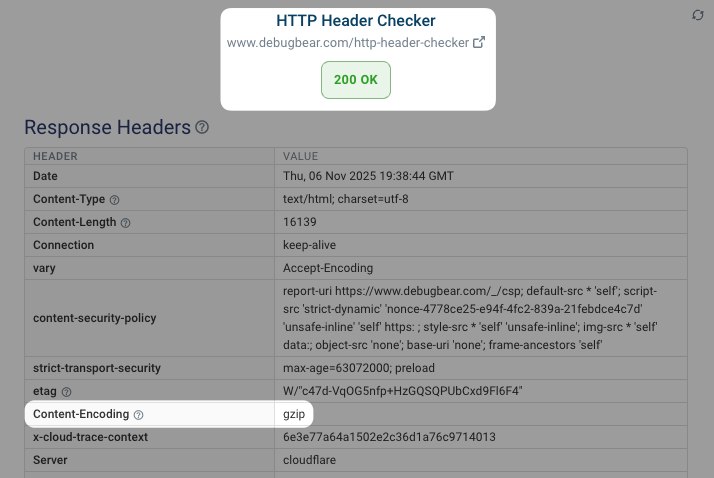
Important Headers to Look For
When reviewing response headers, look for values that confirm compression and caching behavior are active. These headers help identify whether content is being compressed correctly before being delivered to visitors.
Common headers include:
content-encoding: gzipcontent-encoding: brcache-controlexpires
The gzip value usually confirms Gzip compression, while br indicates Brotli compression is active.
Compression and CDN Considerations
If compression is already active at the CDN, hosting, or server level, FastMe does not usually need to force compression again. In many setups, the CDN or server should remain the primary authority for compression handling to avoid duplicate or conflicting behavior.
Continue reading