CSS Optimization
CSS optimization has high upside, but it is often the section most likely to affect layout.
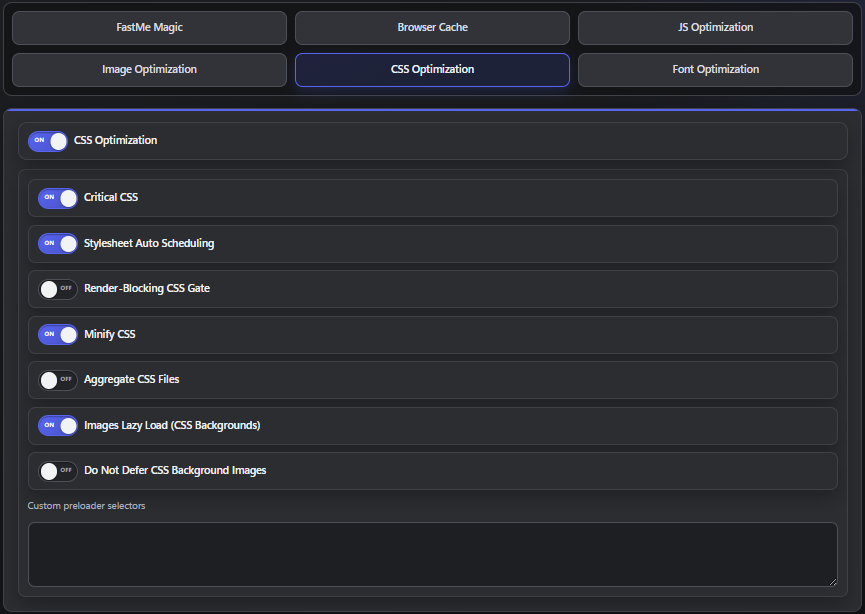
Common options may include:
critical CSS
stylesheet scheduling
render-blocking CSS reduction
CSS minification
CSS aggregation
lazy loading of some visual assets
Critical CSS
Critical CSS helps display above-the-fold content faster.
If it works well, pages may feel faster because the first visible layout appears sooner.
If it fails, you may see:
unstyled content
layout shifting
late-loading theme styles
If the site looks broken after enabling it, turn it off first and retest.
Stylesheet Auto Scheduling
This can improve how styles are delivered, but some themes are sensitive to stylesheet order.
If CSS appears incomplete:
disable this setting
purge caches
retest
Render-Blocking CSS Reduction
This tries to reduce CSS that blocks initial paint.
It can help performance, but test carefully on:
builder-based sites
animation-heavy themes
sites using many plugin stylesheets
Minify CSS
Usually lower risk than stronger CSS features, but still verify:
buttons
menus
mobile layout
forms
custom page templates
Aggregate CSS Files
This is one of the settings most likely to create compatibility issues.
Avoid turning it on first.
Test it only after the rest of the site is stable.
If layout problems appear, disable it immediately and clear all caches.
Images Lazy Load for CSS Backgrounds
This can help on media-heavy pages, but it may affect:
hero sections
banners
sliders
cards using background images
If important above-the-fold imagery appears late, exclude it from lazy behavior if your build supports exclusions, or disable this setting.
Do Not Defer Critical Background Images
Use this when:
the homepage hero background is essential
the site feels visually blank at first
a banner image is central to the first screen
This option usually makes sense for a small number of important backgrounds, not every background image on the site.
Custom Preloader Selectors
Some themes use preloaders, splash screens, or custom loading overlays.
If a preloader gets stuck:
confirm the selector was entered correctly
temporarily disable aggressive JS or CSS changes
retest
Only add selectors you understand. Guessing random selectors can make debugging harder.
Continue reading