JS Optimization
JavaScript optimization can improve loading performance, reduce render-blocking behavior, and help websites achieve better performance metrics. However, this is also one of the most compatibility-sensitive areas on WordPress websites.
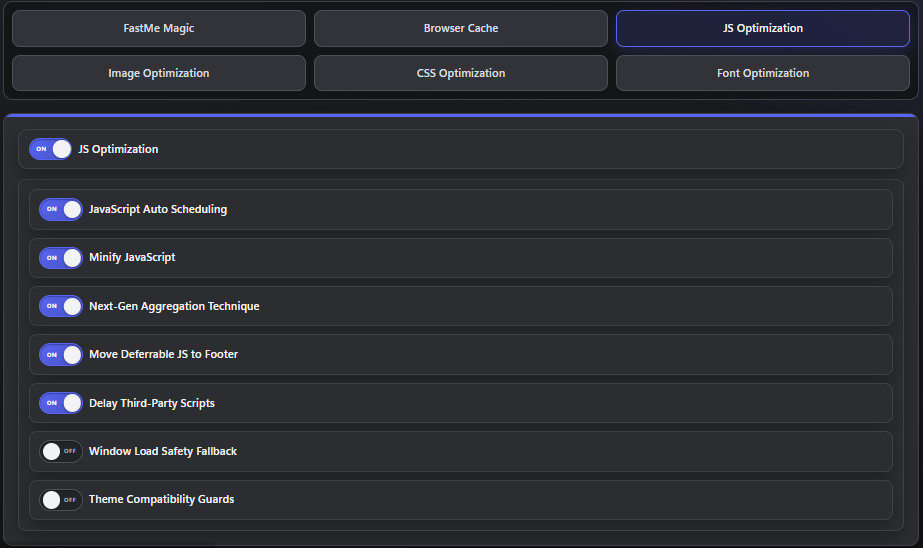
Because many themes, builders, and plugins rely heavily on JavaScript behavior, changes in this section should always be tested carefully after enabling new optimizations.
Fastme JavaScript Optimization Features
Depending on your FastMe version, this section may include features such as:
automatic scheduling or delay rules
minification
aggregation
moving safe scripts to the footer
delaying third-party scripts
compatibility fallbacks
These features can improve performance significantly on some websites, but aggressive settings may also introduce compatibility problems if enabled without testing.
JavaScript Auto Scheduling
`JavaScript Auto Scheduling` attempts to load scripts more efficiently to reduce blocking behavior during the initial page render. This can help improve loading metrics and reduce unnecessary JavaScript execution during early page load stages.
Potential benefits may include:
fewer blocking scripts during initial load
improved performance metrics
Possible risks may include:
broken sliders
forms submitting incorrectly
popups not opening
analytics or chat loading late
Always test important user interactions after enabling scheduling or delay-related optimizations.
Minify JavaScript
`Minify JavaScript` removes unnecessary characters, spaces, and formatting from JavaScript files to reduce overall file size. In most cases this is considered a lower-risk optimization, but compatibility testing is still important.
After enabling minification, test important website areas such as:
checkout flows
forms
search
login or account areas
custom calculators or widgets
Even simple minification can occasionally expose problems in poorly written scripts or older plugins.
JavaScript Aggregation
`JavaScript Aggregation` combines multiple script files together to reduce the number of browser requests made during page loading. This can improve performance on some websites, especially when many small JavaScript files are being loaded separately.
Use additional caution on:
sites with many plugin scripts
WooCommerce
builders that inject scripts dynamically
websites relying on exact script execution order
Aggregation can sometimes create execution-order conflicts that break front-end functionality or interactive elements.
Delay Third-Party Scripts
This setting delays external scripts that commonly come from third-party services and embedded platforms. Reducing early third-party loading can significantly improve page performance and reduce unnecessary requests during initial rendering.
Examples of delayed third-party services may include:
analytics
chat widgets
ad networks
video embeds
social media embeds
This optimization is powerful, but it also carries higher compatibility risk. Delaying scripts too aggressively can sometimes cause:
consent banners failing
analytics events missing
payment widgets loading late
embedded videos not appearing quickly
Always verify business-critical integrations after enabling script delays.
Compatibility Fallbacks
Some FastMe builds include compatibility fallback options designed to improve behavior on difficult themes, unusual hosting environments, or edge-case plugin combinations. These settings are typically intended as targeted fixes rather than general performance optimizations.
Enable compatibility fallbacks only when:
a known theme issue appears
a page gets stuck during load
support specifically recommends them
Do not enable every fallback setting by default. Each compatibility option should solve a specific issue rather than being used as a general-purpose safety toggle.
Continue reading